


Maintain school structure
School details, branches, rooms, licence categories and examiners provide the foundation for intake and scheduling. A configurable dashboard groups statistics, requests, signatures and activity.
RoadReview connects student intake, teaching schedules, documents and invoicing. Office staff and instructors work on the same records, from the first enquiry to a settled invoice.
A booking is planned. A delivered lesson is confirmed. A delivered service is invoiced. RoadReview distinguishes these steps and connects them through the student and training record.
Review registration, assign training and keep missing documents visible.
Schedule instructors, students and resources together; decide on booking requests.
Record teaching and confirm delivered services with the student’s signature.
Invoice services, match payments and hand files over to accounting.
Intake & records
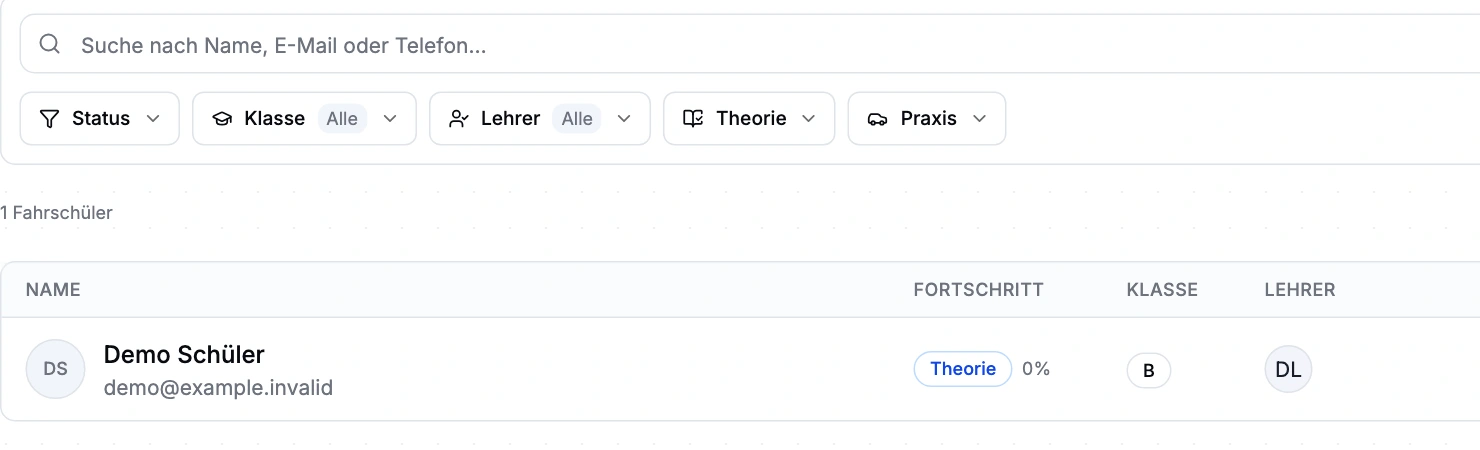
Status, licence category and instructor assignment lead to the right student record. Theory, lessons, exams, documents and outstanding services remain together. One person can have several training records.
Search, filters and status in a real demo view of the student list.
Services & invoicing
After teaching, the instructor confirms delivered services with the student’s signature. The ledger distinguishes planned, delivered and invoiced items. Office staff transfer delivered items into an invoice draft.
Each module explains the task, handovers and current requirements. All are part of the closed beta.
Keep intake, training, documents and outstanding services together with the student. Check the current status before handling the next appointment, approval or invoice.
Explore the module and workflowBring instructors, students, vehicles, branches and rooms into one schedule. Availability, buffers and absences help you find suitable times.
Explore the module and workflowThe service ledger, invoice and payment belong to the same workflow. Office staff can see what was delivered, what remains to be invoiced and which balance is outstanding.
Explore the module and workflowDefine required documents by licence category, collect uploads in the student record and work with templates and document-specific signatures.
Explore the module and workflowThe topic catalogue, courses, sessions and attendance form one theory workflow. See the status of each training record and plan for missing topics.
Explore the module and workflowPlan exams and record attempts and results with the student. Training progress and read-only TÜV Nord status support preparation for the next step.
Explore the module and workflowStaff records, leave, target hours and appointment-based credits support workforce planning. Reports help you hand over scheduled and recorded hours.
Explore the module and workflowKeep vehicles with their training categories, odometer readings and equipment. Where suitable lesson data exists, consumption and estimated costs add context to the vehicle record.
Explore the module and workflowThe school-scoped assistant connects questions to existing management functions. Significant changes remain subject to your permissions and the required approvals.
Explore the module and workflowDirect registration, confirmation or offer: the school chooses when to make its decision and which steps the student follows next.
Explore the module and workflowMaintain branding, staff, vehicles, services and locations in the same management system. Prepare the public presentation through its own draft and publication process.
Explore the module and workflowSchool details, branches, rooms, licence categories and examiners provide the foundation for intake and scheduling. A configurable dashboard groups statistics, requests, signatures and activity.
Student chat, school email with drafts and attachments, push and announcements stay within the school context. App calls depend on devices and setup. We configure and check email and calling options with you during beta onboarding.
Activity records for the school, students and staff help you follow changes. AI actions remain subject to the same user permissions and required approvals.
See the AI workflowOffice staff maintain and review records. Instructors plan and confirm through their instructor access. Owners configure the school, staff and approvals.
Anyone working in the driving school management interface currently needs full school administration access. Finer office roles are not available yet. We plan responsibilities and access with you during onboarding.
Driving school management is in closed beta. Tell us about your school and workflows. We will discuss whether the scope, setup and access fit your school. Applying does not confirm admission or activate access.
Describe intake, scheduling and invoicing at your school. We review suitable modules and handovers.
Responsibilities, existing records, documents and payment or email providers are part of onboarding. Complete migration from arbitrary third-party systems is currently unavailable.
TÜV Nord exam status is displayed; you still register in the portal. DATEV is available as export files. You can subscribe to appointments in external calendars. Registration advance payments are not yet available for every school.
Driving school management is in closed beta. Tell us about your school and workflows. We will discuss whether the scope, setup and access fit your school. Applying does not confirm admission or activate access.
The RoadReview app records driving lessons and feedback. Management is the product for school-wide intake, scheduling and invoicing, and is in closed beta. Access and setup are discussed separately.
This page does not promise management pricing or free access. Scope and terms are discussed for the beta. Amounts in screenshots are fictional student invoice items, not product prices.
Driving school management is in closed beta. Tell us about your school and workflows. We will discuss whether the scope, setup and access fit your school. Applying does not confirm admission or activate access.