The lesson ends. Your feedback stays.
The RoadReview App connects driven routes with recorded situations and explanations. Instructors document the lesson. Students review it and bring specific questions to the next drive.
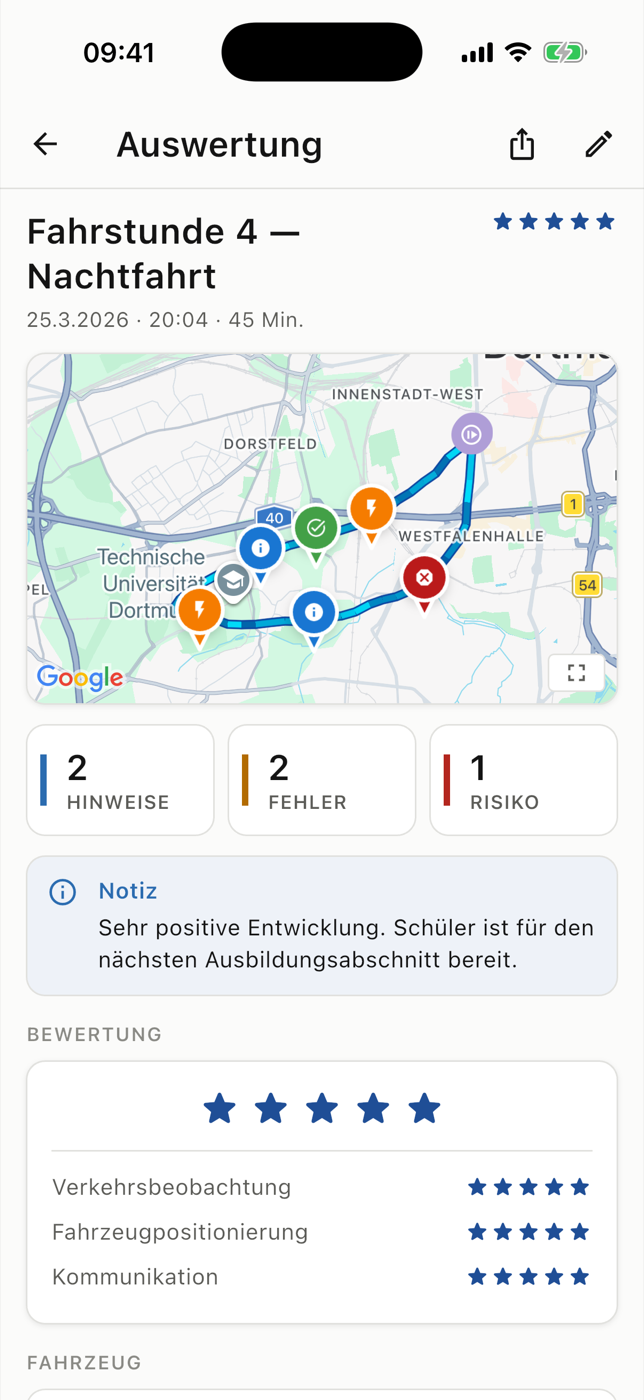
- Route with recorded situations
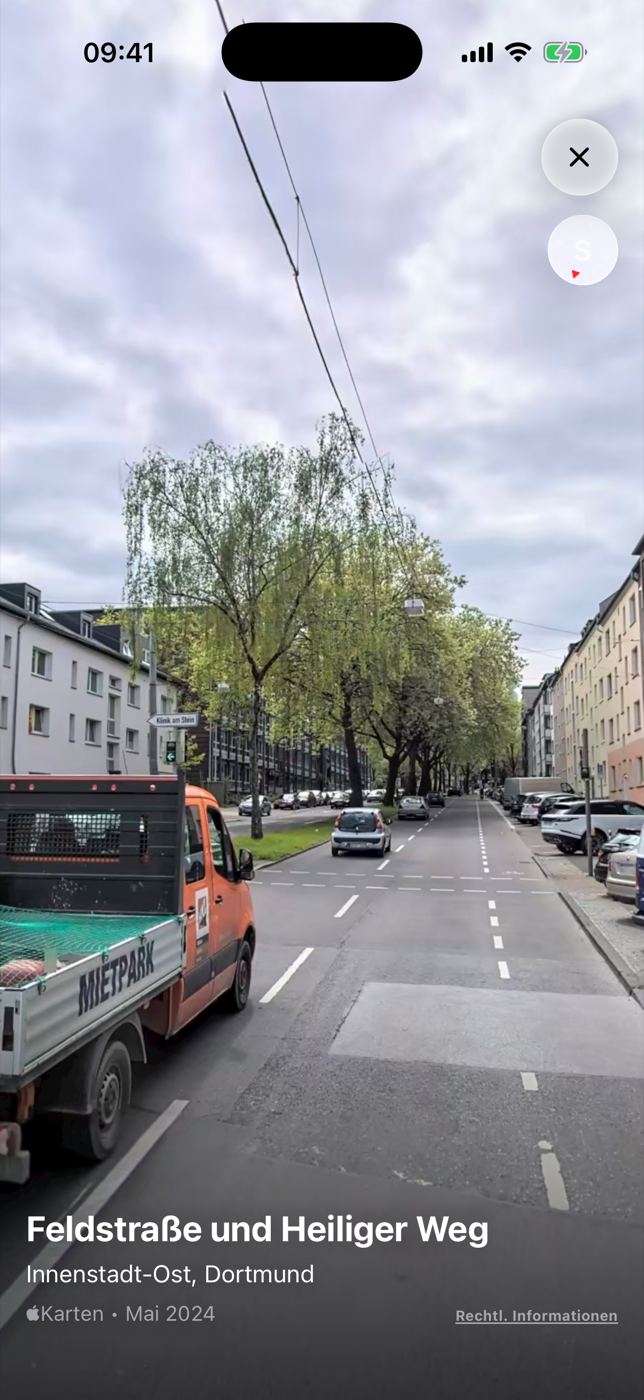
- Street imagery at the mistake location
- GPS points recorded¹
- Over 4 million
- students accompanied¹
- Over 1,000
¹ Usage figures supplied by the operator. They do not imply a pass rate or a reduction in lessons or costs.
One connected workflow
Before, during and after the driving lesson.
Feedback becomes useful when you return to it. RoadReview keeps the context from the practice aim through to the next lesson.
Prepare
Check the student profile, task progress and previous feedback. Choose a focus; add suitable spots or catalogue routes.
InstructorRecord
Record the GPS track, mark situations and capture explanations. Connect training-record tasks to the lesson.
InstructorComplete
Check entries and add learning points and next steps. Sync the lesson or save it locally for upload later.
InstructorReview
As a student, revisit specific places and feedback, add your own reflection and collect questions for the next lesson.
Student
The situation has a place
Find the junction again. Understand the feedback.
“Check more carefully when turning” becomes concrete when you can see the place again. The route, marker, description and available street imagery put the feedback in context.
- The saved route with recorded situations
- Descriptions and severity from the instructor’s record
- Available street imagery from the map provider; not lesson footage
Feedback you can return to
An explanation that survives the journey home.
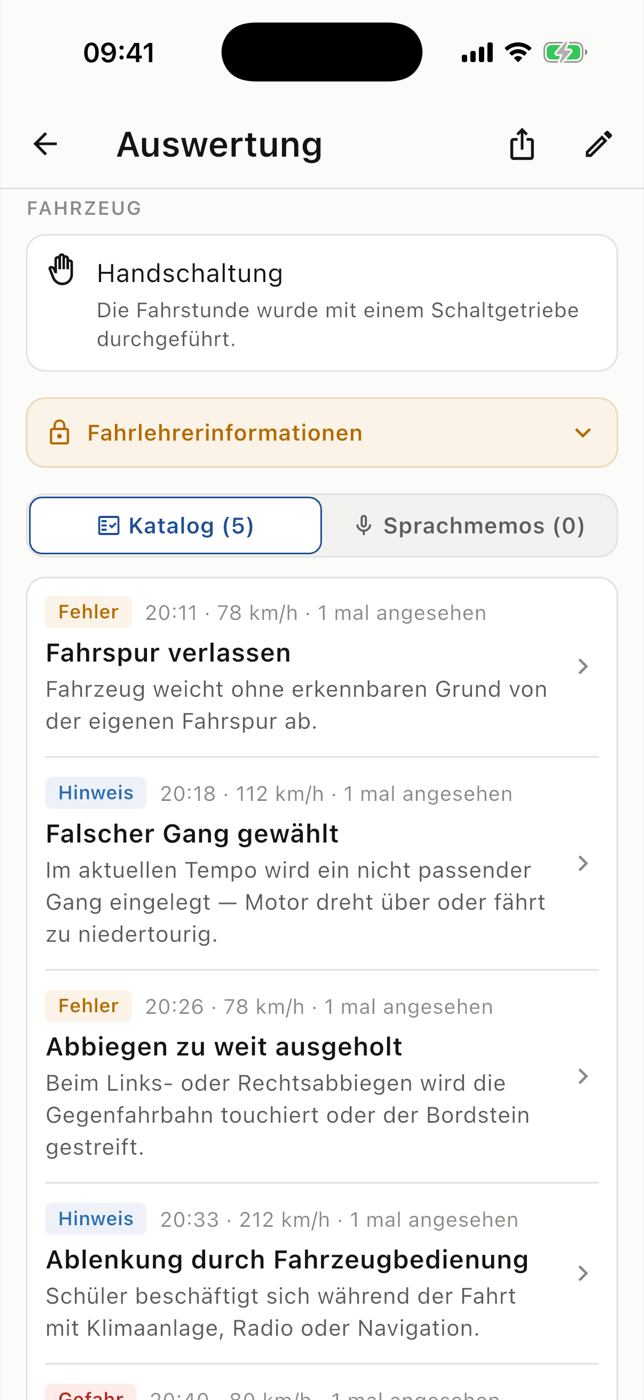
The mistake list gives feedback a name and severity. Available voice notes and transcripts add the explanation. At completion, learning points and next steps stay attached to the lesson.
- Listen again to available voice notes
- Check transcripts and summary notes
- Keep the lesson summary as a recording or enter text when transcription fails
Task by task
See what has been practised and what comes next.
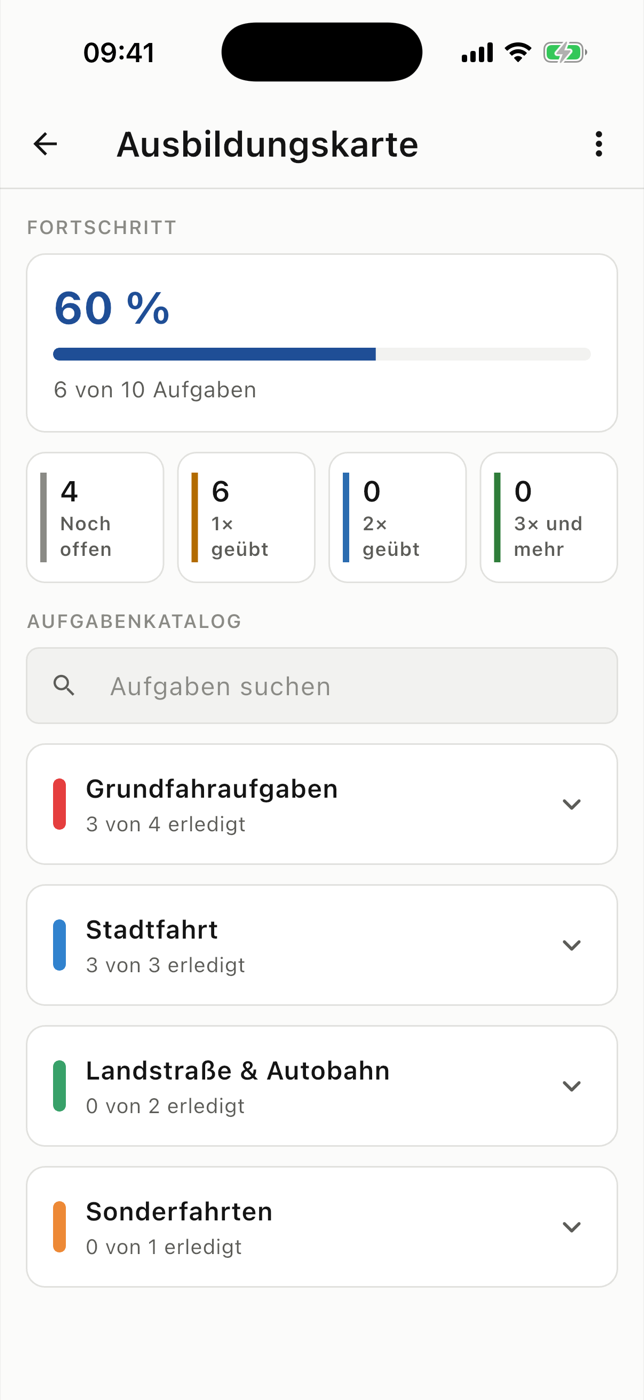
The training record organises tasks, practice logs and history. The driving progress score adds the development of recorded lessons. Both support discussion; professional judgement stays with the instructor.
- School-specific categories and task templates
- Documented practice and PDF export
- A 0–100 progress scale for orientation, not a probability of passing
Between lessons
Make review a deliberate part of your training.
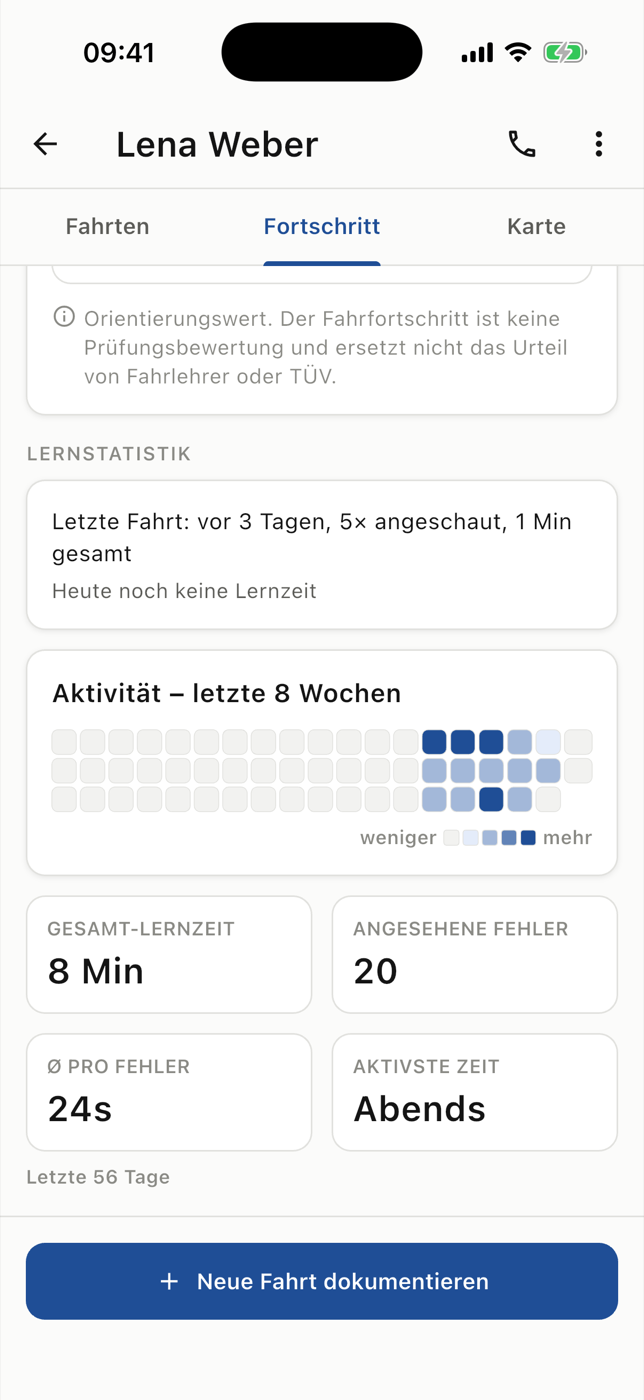
Learning statistics show when recorded situations were reviewed in the app. Self-assessment adds your perspective on the lesson; the technical quiz covers further learning questions.
- Review activity, views and time across days
- Personal reflection alongside instructor feedback
- A technical quiz that complements practical training
Two perspectives on the same lesson.
For driving instructors
Prepare, record situations and capture specific learning points. With student profiles, training records and later uploads.
For learner drivers
Understand the last lesson: review mistake locations and explanations, add your perspective and prepare specific questions. Access is through your driving school.
The app in detail
Explore every part of the workflow.
Each feature has its own role. Detail pages explain the workflow, purpose and requirements, from the first GPS track to optional hardware additions.
Record & review
7 features · Lesson recording, Map & mistake locations, Mistake log, Voice notes & transcription, Self-assessment, lesson video, vehicle data
Record & review
7 features · Lesson recording, Map & mistake locations, Mistake log, Voice notes & transcription, Self-assessment, lesson video, vehicle data
-
Lesson recording
Keep the route and feedback in one lesson record.
-
Map & mistake locations
Find mistake locations and their surroundings again.
-
Mistake log
Read explanations of notes, mistakes and risks.
-
Voice notes & transcription
Listen to or read spoken explanations later.
-
Self-assessment
Record your perspective alongside instructor feedback.
-
Optional: lesson video
Review available camera clips alongside feedback.
-
Optional: vehicle data
Read available vehicle values as added context.
Training progress & review habits
6 features · Training record, Learning progress, Driving progress, Learning statistics, Technical quiz, Training overview
Training progress & review habits
6 features · Training record, Learning progress, Driving progress, Learning statistics, Technical quiz, Training overview
-
Training record
Track practised tasks and open areas.
-
Learning progress
Distinguish task progress, lesson assessment and review.
-
Driving progress
Discuss the driving progress trend together.
-
Learning statistics
See days, views and time spent reviewing in the app.
-
Technical quiz
Practise vehicle topics and read answer feedback.
-
Training overview
See training activity and lesson review at a glance.
Practice spots & routes
6 features · Practice spots, Network practice spots, Route suggestions, Route catalogue, Export routes, Open in Google Maps
Practice spots & routes
6 features · Practice spots, Network practice spots, Route suggestions, Route catalogue, Export routes, Open in Google Maps
-
Practice spots
Choose practice locations for the next lesson.
-
Network practice spots
Discover additional places from participating schools.
-
Route suggestions
Compare and check experimental practice routes.
-
Route catalogue
Reuse useful recorded routes across your school.
-
Export routes
Export GPX tracks or use mapping links.
-
Open in Google Maps
Hand selected waypoints to Google Maps.
A clear way to join your school’s workflow.
Students
Ask your driving school whether it uses RoadReview. Your student account is linked to the school. The app shows the lessons recorded and synced there.
Schools and instructors
Register your interest. We will discuss introduction, school linking and suitable features. If you would like to use a camera or OBD, we will discuss suitable devices and available features with you.
Your enquiry starts a conversation about a suitable introduction. Access is then set up with the driving school.
Questions about the RoadReview App
Who is the RoadReview App for?
The app supports driving instructors who document practical lessons and students who review them. Students are linked through their participating driving school.
Is the app already in use?
Yes. According to the operator, RoadReview has recorded over 4 million GPS points and accompanied over 1,000 students. These are usage figures, not evidence of a particular pass rate or savings.
How can my school join?
Register your interest using the contact form. We will discuss the introduction and requirements with you. An enquiry does not automatically activate an account.
Do I need a camera or OBD adapter?
No. Smartphone GPS, recorded situations and notes provide the core workflow. Video and vehicle data are optional additions with hardware-specific requirements.
Does the progress score predict my test result?
No. The 0–100 driving progress score gives orientation from recorded lessons. It is not a probability of passing and does not replace your instructor’s assessment.
What happens without an internet connection?
Completed lessons can be saved locally and uploaded later. Maps, transcription, route calculation and access to newly recorded lessons on other devices require a connection.
Give the next lesson a clear starting point.
Would you like to connect recorded lessons and review at your driving school? Register your interest in the app. We will discuss a suitable introduction.