Online registration Closed Beta

Make intake follow your school’s process.

Direct registration, confirmation or offer: the school chooses when to make its decision and which steps the student follows next.

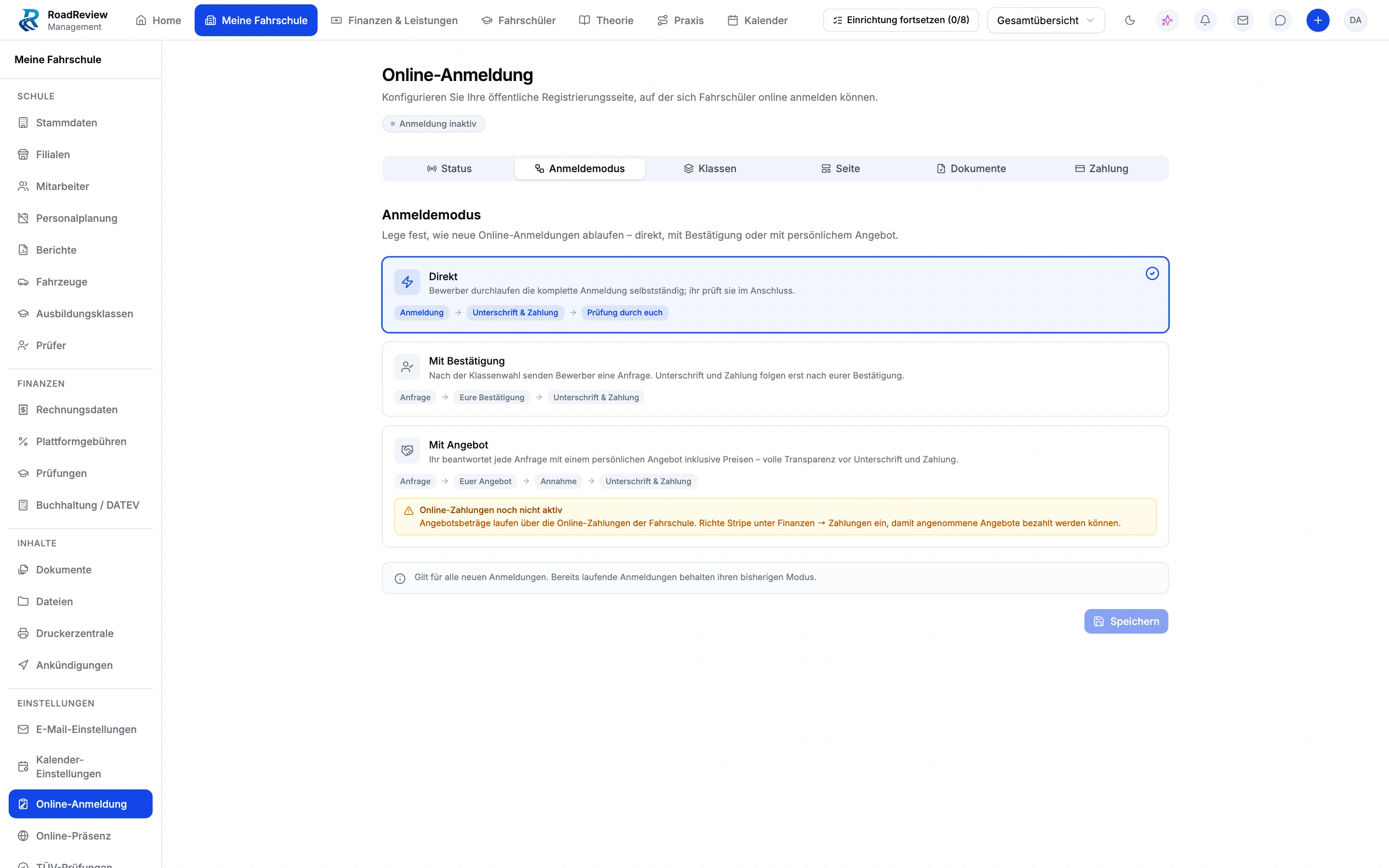
Settings for direct registration, registration with confirmation and registration with an offer. Enlarge view (new tab)
Closed beta demo view. Online registration and payments are switched off in the demo school; the interface notices remain visible. The original product interface is shown in German.

Choose your school’s intake process

Three modes with different decision points

With direct registration, the student completes all registration steps before the school reviews pending admission. With registration by confirmation, the school decides before the remaining steps. With registration by offer, the student receives a personal offer and can accept it within its validity period.

Configure categories and documents

The school configures offered licence categories and relevant document requirements. The student chooses training and completes the required details and documents, creating the record in the context of that category.

Handle pending registrations

Requests and offers appear as actionable items. Staff review, confirm or decline them, or create an offer. Registrations already started keep their mode when the school changes its setting.

Check registration and payment separately

Online registration and invoice payments have different requirements. Registration advance payments are not yet available for every school. During beta onboarding, we discuss usable intake steps and set up and check your school’s payment methods.

From choosing a category to the intake decision

  1. Configure

    Set licence categories, documents and registration mode.

  2. Submit

    The student chooses a category and enters the required details.

  3. Decide

    The school reviews admission or an offer at the chosen stage.

  4. Complete

    Complete the remaining document and registration steps under the selected process.

Discuss intake and advance payments during onboarding

Even direct registration does not mean automatic admission. Registration advance payments are not yet available for every school. The closed beta application is for driving schools; students register with their school.

Explore registration forms, school codes and the catalogue

Questions about registration modes and intake

What happens when we change the mode?

Registrations already in progress retain their original mode. The new setting applies to new flows.

Is a direct registration admitted automatically?

No. The student completes all registration steps first. The school then reviews pending admission.

How do we get access?

Driving school management is in closed beta. Tell us about your school and workflows. We will discuss whether the scope, setup and access fit your school. Applying does not confirm admission or activate access.

What access does our office team need?

Anyone working in the driving school management interface currently needs full school administration access. Finer office roles are not available yet. We plan responsibilities and access with you during onboarding.

When do you decide on new registrations?

Driving school management is in closed beta. Tell us about your school and workflows. We will discuss whether the scope, setup and access fit your school. Applying does not confirm admission or activate access.